

The disavow file has given headaches to all SEOs and webmasters ever since it was introduced, I think it was around 2012–2013, I don’t remember exactly, but I do remember that the first time I heard about this tool was from Matt Cutts, the Google “spokesperson” for search engine optimization back in the good old days. He was like a John Mueller, but one who actually gave relevant answers.
Table of Contents
Questioning the real value of the Disavow File
Let’s get back to the subject, because we strayed a bit with history.
The disavow file, at least for me, has never had any clear value. I mean, it only helped me and seemed to make sense once in its entire history of use, namely around 2012, after Google Penguin came into the SEO world.
(A small side note for those who don’t know what Google Penguin is: it’s a Google update that basically acts as a link police. Sites that use spammy backlink methods fall into its filter and get penalized, either physically with a direct message in Google Webmaster Tools, or algorithmically, without you realizing it, but you can tell something negative is happening to your site, by an instant drop in organic traffic)
A single successful case
Returning to the topic for the second time: the only time it seemed to make sense to create a disavow file was after Google Penguin was rolled out and I had a client, a gift-basket site, which until Penguin had only directory links, packages of hundreds of links bought all at once on a single anchor, etc. (basically, the kind of practices common back then).
This site was penalized (algorithmically, so without a message in GSC), and because it was post-Penguin, I said clearly the problem was there, in the area of spammy links, so I created a disavow file with hundreds of spammy sites linking to this site. The site recovered its lost traffic in about 2 months after uploading the file.
Is it still worth creating a disavow file nowadays?
Normally I would say no, because creating a disavow file can backfire on your site, even if it is done correctly.
You might add sites with a perfect profile for a disavow file: spammy, toxic, etc., but if these sites are old, your backlink profile has only 20 domains and these are 300 domains, Google can be dumb enough to take your disavow file into account (which it should), but the shock for the site of having so many domains disavowed can be so big that the site might simply drop in rankings.
So is a disavow file worth it, or is it too risky?
If you have a site with traffic and it falls into the class described above: very few clean domains, many spammy and toxic ones, but old and well-established, it’s better to leave it alone and not bother creating a disavow file, because anyway, most of the time, Google knows how to figure out which sites are toxic or not.
Can Google simply ignore the disavow file?
Yes, most of the time it doesn’t take it into account. As I said, I believe that in more than 150 cases of creating a disavow file, it only worked once.
When and how to create a disavow file if you really want to take this step?
First of all, for beginners, here are the technical steps:
Create a simple .txt file (UTF-8).
On each line, write:
domain:site-name.com to disavow an entire domain
or the full address of a page if you only want to block a single link.
You can add comments with # (Google ignores them).
Save the file and upload it here:
https://search.google.com/search-console/disavow-links
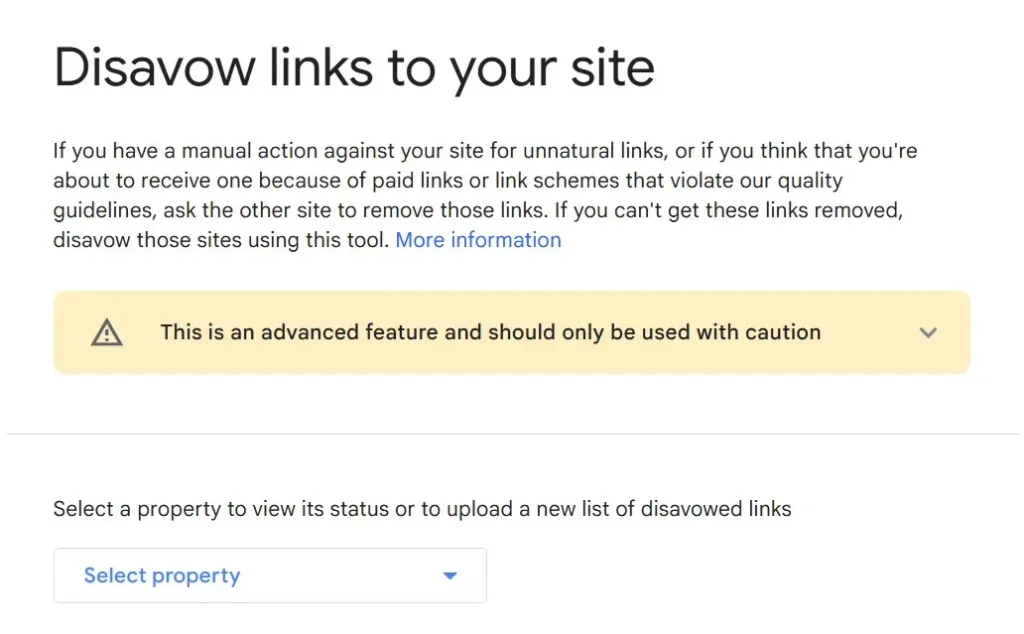
And so you don’t have to do everything by eye, use tools like Ahrefs, Semrush, Majestic, or even Google Search Console to build your list. For example, in Ahrefs go to Backlink profile and start filtering by DR, anchors, etc.
What should you add to the disavow file?
I’ll start by telling you what not to add.
First of all, do not add domains that simply have a Domain Rating of 0. This is a practice used by many amateurs who have no idea about SEO and don’t understand the concept of SEO or a site’s value. Many people think that if a site with Domain Rating 0 links to your site, it’s bad.
That’s pure nonsense. Let me give you an example:
If you have an online bookstore, and a book enthusiast has a site where they talk about books, but the poor guy created his site just 2 months ago and links to you… Should I put this site in the disavow file? No. Not at all. That link is probably better than one from a Domain Rating 30 news site that has nothing to do with your niche, so don’t make this mistake.
So what kind of sites should you add to the disavow file?
First, look at the TLDs.
If you see TLDs such as: .xyz, .top, .club, .online, .site, .space, .pw, .gq, .cf, .ml, .ga, .tk, .work, .icu, .bid, .men, .win, .click, .loan, .download, .party, .science, .cam, .monster, .fun, .in, .pk, they are most often not natural links to your website, so consider adding them to your disavow list.
Manual inspection of unfamiliar sites
Then go through the sites one by one, even if there are thousands (yes, you heard right, even if there are thousands). Open the sites that don’t look familiar and if you see strange languages, Chinese, Russian, etc., and your site is in English, straight to the disavow file.
Scraper and directory listings
Also, if the sites you open are the kind of site listings that scrape the entire internet and add your site to a list of hundreds or thousands of links, straight to the disavow file.
Sites with adult or shady ads
Next, if you find sites that seem normal but inside have only links and strange banners to adult sites or potency sites, those kinds of ads go straight to the disavow file as well.
Don’t blindly trust “toxic” flags from tools
Another side note for those who add to the disavow list sites that certain tools flag as toxic. Never rely on such tools. I have seen many sites flagged as toxic when that was not the case.
Check anchor text for spam attacks
And last but not least, you need to check the anchors through which those sites link to your site.
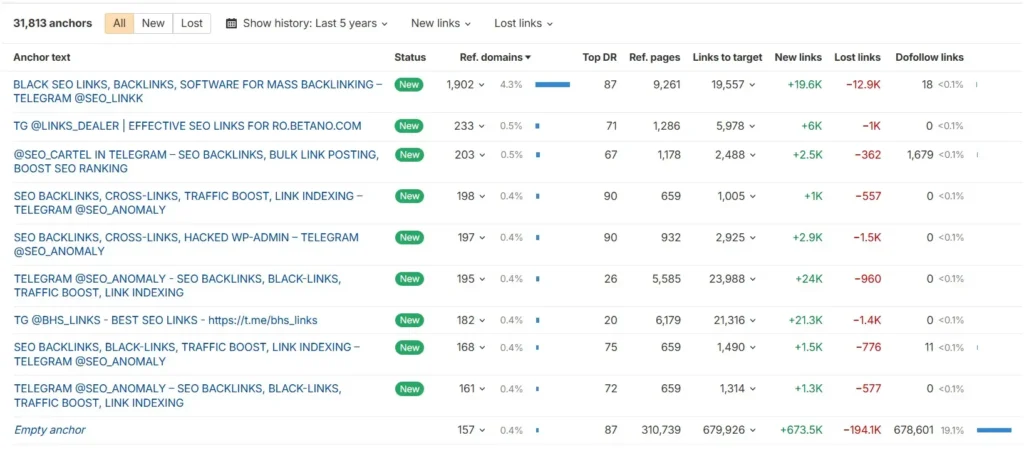
There are bad actors, “SEO agencies” that intentionally spam the entire internet by placing fake anchors on decent sites, but anchors that can harm your site, especially through spammy content. For example, see the image below showing the kind of anchors pointing to this site:
Monitor backlinks regularly
If you catch this type of site early, you’ll need to add it to the disavow file. That’s why I recommend checking your backlink profile weekly, for your own site or your clients’ sites. Catching issues early is much better, because as I said earlier, if you wait for years, even a toxic and spammy site can take root and there may be consequences if you intervene too late with a disavow file (assuming Google will even take it into account)
That being said, I believe it’s still better to avoid creating any disavow file and to let old Google separate the good sites from the bad ones, because if we examine 100 successful organic sites right now, I assure you that 99 of them have spammy links and no one has paid them any attention.